
How it works
One idea, followed all the way through: track what you decide, work out the rest. Here is a full year of it, with the arithmetic shown.
The thing most budgets get backwards
A normal budget asks you to record spending as it happens, then adds it up. That puts the work at the worst possible moment, hundreds of times a month, and the total is only as good as your least disciplined week.
Yearfolio turns it around. Your bank balance at the end of the month is already a perfect record of everything you spent, and it costs you nothing to read. So you record the few things worth deciding about, and let subtraction handle the rest.
general expenses = month start + income − major expenses − total balance
General expenses is everything routine: groceries, bills, fuel, eating out, the everyday things. You never type it. Major expenses are the lumpy and irregular ones, the ones worth a decision: rent, a flight, school fees, a laptop. Those you name. A wallet is anywhere your money sits, and you enter what each holds once a month.
Setting up takes four questions
Nothing else is asked up front. Everything after this is a change to the table.
- Your currency, which you can change later.
- How much money you have right now. Every account and the cash, added up, roughly. It starts as one wallet, and you can split it later.
- Your income sources and a typical monthly amount for each. Enter take-home pay, or switch to gross afterwards if you would rather track tax.
- Roughly what a month costs you. Nobody knows this on day one, so instead of asking for a figure, Yearfolio asks whether you save a good chunk, save a little, or spend nearly all of it, and works it out from your income. It gets replaced by the real number the first time you complete a month.
Yearfolio then builds the current calendar year. The months already behind you are filled in from your estimates and completed, ending on the amount you typed. This month is open, ready to plan.
Completing a month, with real numbers
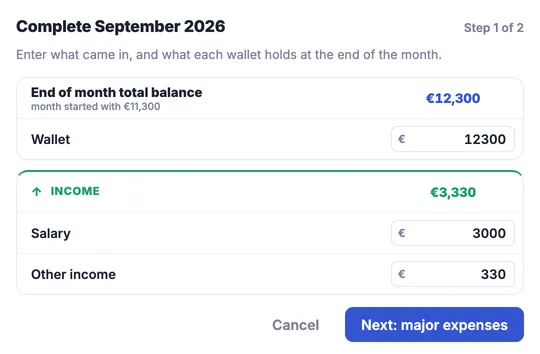
It is the first of October and September is waiting to be completed. September started with 11,300 across your wallets. The dialog asks two questions.
Step one: what is left
Your salary landed, 3,000, and a side project paid 330. At the end of the month your wallets hold 12,300, so you type that in. Last month's figures are already there as a starting point, which makes this a correction rather than an entry.
Step two: was anything major
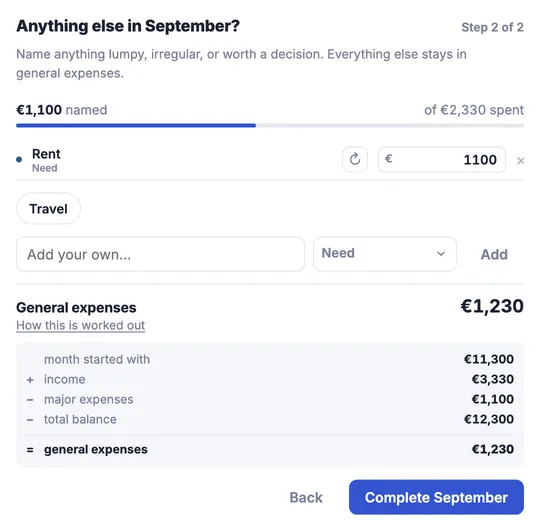
Yearfolio can now see that September spent 2,330, and asks how much of that is worth a name. Rent was 1,100, so you name it and leave the rest alone. Naming does not change your balance. It only moves part of what you already spent out of general expenses and under a name of its own.
What Yearfolio works out
11,300 month start
+ 3,330 income
− 1,100 major expenses (rent)
− 12,300 total balance
= 1,230 general expenses
September cost 1,230 in ordinary living, and you did not track a single receipt to learn it. That figure is stored as the real one, September is marked completed, and October starts from 12,300.
Why the second month is the interesting one
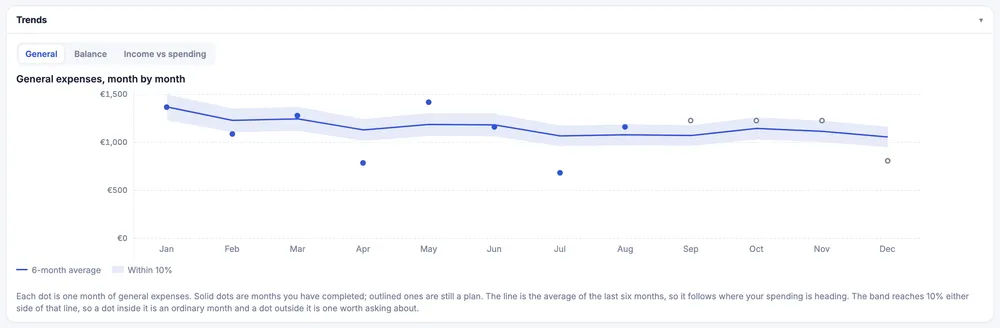
One month gives you a number. Three or four give you a pattern. Ordinary life turns out to be remarkably steady: your general expenses figure lands in a range, and the range is the thing you can plan with.
Once Yearfolio has a few completed months, every open month ahead of you is estimated from what actually happened rather than from a guess. The end-of-year figure stops being wishful. And if some month between here and December dips below zero, it is flagged red now, while you can still do something about it.
Getting it wrong is fine
You will mistype a balance or forget an expense. There is a pencil next to any completed month that opens everything in it for correction, without reopening the month or disturbing the ones after it. General expenses is worked out again from what you fixed.
If the correction changes what your wallets held, that difference flows forward: later completed months shift by the same amount and open months re-estimate. The arithmetic stays true all the way to December.
Then next year
When you are ready, build next year from this one. It carries your categories and your real general expenses figure, and you adjust from there: a raise in June, a holiday in August, rent going up in January. Because it starts from a year you actually lived, the plan is worth something.