
Budget by the year, not the month
Know how this year ends, before it does. Log what you earn and the few major expenses you have, enter what your wallets hold at month end, and Yearfolio works out the rest.
- Free, no card
- No bank connection
- About ten minutes a month
- Practice year to try it
The idea
Stop sorting groceries into categories
Most budgeting apps want every transaction filed under a category. It works for about three weeks. Then you fall behind, the numbers stop being true, and the app turns into another thing you are failing at.
Yearfolio only asks about the money you actually make decisions about: what came in, and the handful of expenses major enough to be worth naming. Everything routine, the groceries and the fuel and the coffee, is one number called general expenses, and you never type it. It comes out of arithmetic you cannot get wrong, because your bank already knows the answer:
Once a month
The whole routine, about ten minutes
On the first of the month, with a coffee. Yearfolio asks two questions and you are done until next month.
What is left
Open the month that just ended and type what each wallet holds: the bank, the other bank, the cash in the drawer. Last month's figures are already filled in, so most months this is a glance and a correction.
Was anything major
Yearfolio shows what the month spent and asks how much of it deserves a name. Rent, a flight, a new laptop. Naming something moves it out of general expenses and under a name and purpose you chose. Nothing major? Leave it empty.
That is it
General expenses is worked out and stored, the month is marked completed, and every month after it re-estimates from the balance you just confirmed. You see straight away where the year now ends up.
In practice
What a month end actually looks like
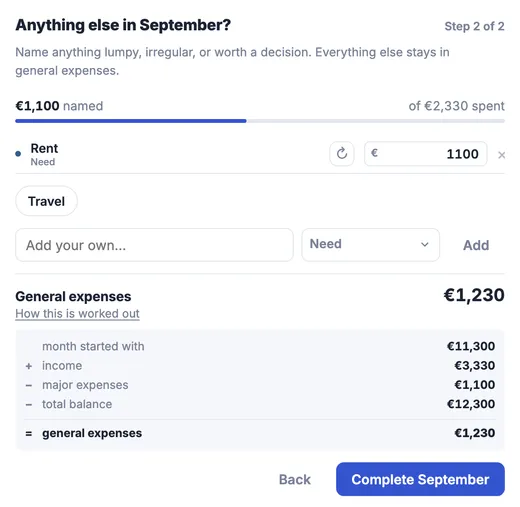
Two questions, and the arithmetic is done
Yearfolio shows you what the month spent and asks how much of it deserves a name. Everything you do not name stays as general expenses, worked out from figures you already confirmed.
- Your own categories first, most recent at the front
- Copy a repeating cost onto the rest of the year at once
- Naming never moves a balance, only splits what was spent
Then the pattern shows up on its own
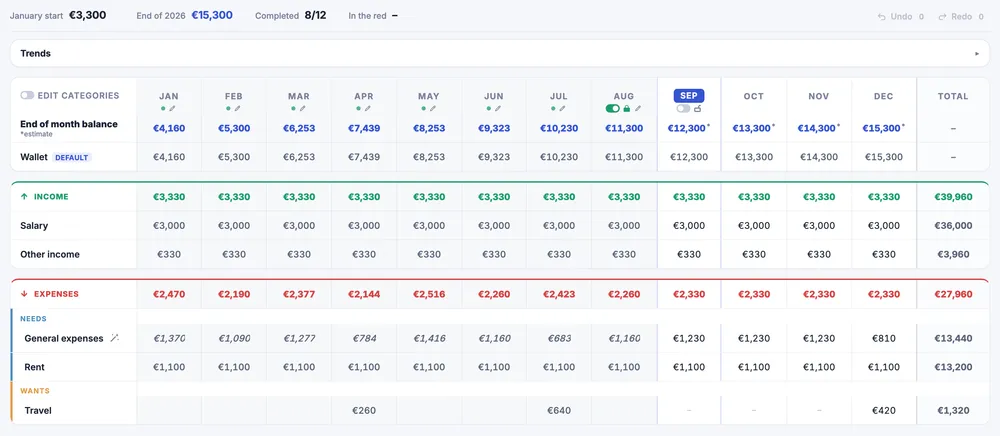
Individual months stay noisy: this year runs from 683 to 1,416. What settles down is the average of the last six months, and it settles fast. From the fourth month it barely moves again, and that is the figure the rest of the year is estimated from.
- Completed months and estimates are marked apart
- A six-month average sits behind every month
- Compare years once you have more than one
The shift
From filing the past to shaping the year
Both of these describe the same twelve months. Only one of them is work you will still be doing in March.
Tracking the past
Every purchase filed under a heading, all year, by you.
Planning the year
Four numbers a month, and the twelve of them are a plan.
What you get, and when
The first month is a fact. The first year is a plan.
- After one month
One real number
What an ordinary month costs you, worked out from your own balance. No receipts, no categories, and nothing to disagree with.
- After three
A range, not a guess
The average stops moving. You now know what a month costs the way you know your rent, and every month still ahead of you estimates from that.
- After six
A year you can see
December becomes a figure rather than a hope, and any month that would put you in the red is flagged while there is still time to move something.
- Next year
A plan, and a plan B
Build the year from the one you actually lived, then copy it and test the things that worry you: a move, a raise, a stretch without work.
And then: what if it goes differently
Once a year is real, you can copy it and change it freely. Rent goes up, a contract ends, you take three months off. The copy answers, and your live plan never moves until you say so.
- Save as many what-ifs as you like, side by side
- Apply one to the live plan, or throw it away
- Months that go below zero are flagged in every one
Whether this suits you
Residual budgeting is a real trade. It is worth knowing which side of it you are on before you sign up.
A good fit if
- You have tried expense trackers and stopped using them.
- You want to know if this year works out, not what you spent on lunch.
- Your income is steady enough to plan around, even if it varies a bit.
- Ten minutes a month sounds like something you would actually do.
A poor fit if
- You want every transaction categorised and charted.
- You want the app to connect to your bank and import for you.
- You need to split shared costs with a partner or a flatmate.
- You are looking for a joint budget rather than a personal one.
What else is in there
Next year, from this year
Build the next year from the one you just lived, then adjust. Your general expenses figure is real by then, so the plan starts from evidence.
What-if without the mess
Save a scenario, change what you like, see how the year lands. Your live plan stays untouched until you apply it.
Your numbers, exportable
Any year downloads as a CSV you can open in Excel, Numbers, or Google Sheets. It is your data and you can take it with you.
Trends, not just a table
Charts for general expenses and for what your wallets hold, across the whole year. Once you have a second year, last year sits behind this one.
Fix a month you got wrong
Open any completed month and change what you typed. General expenses is worked out again, and the difference flows forward on its own.
No bank connection
Yearfolio never touches your bank. You type a handful of numbers a month, which is also why there is nothing to leak.
Try it with a practice year
The first run offers a year of made-up numbers, so you can see how the table behaves before you put anything real in it. Nothing it writes is kept.
Free. No card, no bank connection.